|
Our Multiplayer Games Plugin lets you embed
free MMORPG/multiplayer
games into any Wordpress blog or website.
For Wordpress any version, tested up to the latest Wordpress version.
You can make your visitors play from within your site, like this:
Almost every one of our online mmorpg games list
can be embedded into your website by using this plugin with minimal effort.
Features
Release 3.x comes with many nifty features:
- AdSense support: Easily add ads next to the games and earn mony at no
effort by simply pasting your AdSense ID in the settings!
- New game added: Citadels
- New shortcodes for games list and for inerting single, specifc games to
pages and posts: [games] and [game=#]
- Localization support (sample translation file provided for Italian)
- Configurable window play size (ads are adjusted accordingly)
- Support for Fullscreen play
- Easier styling via the included style.css stylesheet
Download/Install
Recommended and simplest method: Install this plug-in directly from the
Wordpress Admin->Plugins->Add New panel, just search for "multiplayer" and click
[Install].
If it does not work, download this plugin from the
Wordpress website
, unzip and place the plugin in the plugins folder of your WP
installation. the
Wordpress website
, unzip and place the plugin in the plugins folder of your WP
installation.
Getting it to work
1- Activate the plugin from Wordpress Admin->Plugins
2- create a new page name it, say, "Games" and just write:
[games]
in it (this string will be
replaced with the games list). Save & publish this page, see it in action.
3 - Go to Wordpress Admin -> Settings->Multiplayer Games
and edit setttings, remove the games you don't like, add new ones
enjoy!Add New Games!
You can add new free games to the list!
To add new games, go to Admin -> Manage -> Multiplayer Games and click
New Game >>
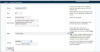
Here is how you add the game: "Four-In-Line" (server: gamesclan slot:
17)
 click to enlarge
Server: Gamesclan.it
Slot: 17
Name: Four-In-Line
Description: A classic board game. Place four pieces in a line, two
players required.
Page: *any page* or your choice (chosen page must use the
multiplayerlist.php template)
Group: new: Board Games (or choose existing group)
click Submit and... voilà
to add more games, you just need to know the server's url the game is
hosted on (use Manage -> Multiplayer Servers to add a new one) and the server's
slot number - check out our online games list
and open a game - the server address and the slot is displayed in the
game's URL.
Example
Suppose you wanted to add the game Four-In-Line you found on our
online games list, but did not have specific
instructions. When playing you have started the game, you look at the URL:
http://www.gamesclan.it/dimx/servlet/multiplayer?game=17&width=1024&height=768
17 = slot number
http://www.gamesclan.it/dimx/servlet/multiplayer
= server's URL, this corresponds to "gamesclan.it" in the plugin's
built-in multiplayer server mappings
So you add game on server "gamesclan.it" and slot number 17.
If the server was not there you just needed to add it on the server mappings.
Support
For technical support on using our plugin, just post on
Wordpress Plugin
Support Forum
To Do
In the next release of the plugin:
- Automatic game add feature via XML FEED
- ...
Have fun! | 












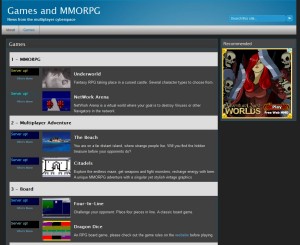 See it working live