Take a look at your PC, where DimensioneX is already installed (previous step).
Under your webserver application folder (Usually C:\DimxPortable\xampp\tomcat\webapps) there should be your DimensioneX folder, named dimx.
Below you see the folder structure of a typical DimensioneX installation (click to enlarge):
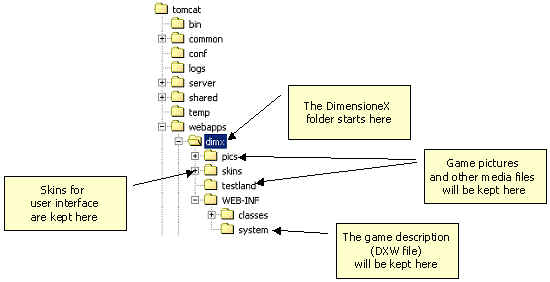
The most important folders for you to consider are:
- dimx this is where everything is kept (game engine, demo games, developed games, media files)
- pics this is where the media and graphics files for demo games (such as The Beach) are kept. In this tutorial you shouldn’t use this one (we don’t want files to be messed up) so you are reqested to create in the dimx folder a subfolder named testland, see below.
- testland will contain all the graphics for our tutorial game. Surely it won’t be there after installing DimensioneX: you have to create it now as part of this tutorial. Please, create it now.
- WEB-INF/system we call this one the DimensioneX system folder. This folder keeps all the configuration stuff, and it’s not meant to be accessible from the web. Here is why the media stuff cannot be placed here. This is where we will create our tutorial game project, which we will call Testland.
Remember:
for each game you develop, you should create a separate folder (such as testland) where to keep the game pictures and media files.
- Have you understood everything in this step?
- Have you created the testland folder?
Okay, let’s proceed.
Click on the Step 2 arrow button.